18
Jun

Powerpoint tips #1

It may now be ‘old school’ but lets face it Powerpoint is a useful tool, we frequently want a stand alone rolling presentations for meditation, contemplation or to make a point [ LIKE THIS ONE ], as well as the obvious use to go along with a sermons.  Personally I would like to see more use of this tool but also for people to think ‘outside the bullet points’ but that’s for a different post…. recently I had to sort out a powerpoint for a few people both at work and church and was asked for some settings.  So I’ll start to put some tips here…

disclaimer - this is all just my opinion and in my experience if you disagree feel free to comment.

In this context I’m thinking about a series of pages with images taking all or sections of the page mixed with quotes, scripture, etc.

FONTS:

  • avoid times / roman type fonts - anything with thick parts and thin parts to each letter as they are harder to read of a screen
  • avoid comic sans at all times as it is almost as evil as cheese
  • Use arial, calibri, candara type of thing - blocky
  • Once you pick a font, stick to it for the entire presentation!
  • Avoid obscure fonts or copy the fonts along with your presentation in case the machine you are going to use doesn’t have the same font.
  • ALWAYS make your font SHADOW as this will help it pop out against the background.  The shadow is black by default so if it is white text on a black background you should probably change this to a light gray tone (white can be too much) or sometimes yellow gives a light glow.
  • (almost) ALWAYS make your font BOLD.  In most cases the text being bold will help the reader, however I would say if it is a page full of text (say more than 80% of the page is text) then I think bold font makes it too busy and therefore difficult to read.
  • text size - I’m not going to suggest a size as it depends on the context the presentation will be viewed, just remember how far away people will be from the screen.

It is worth messing about with your choice of font near the start of a powerpoint project, then once you have set up a text box on one slide you simply duplicate that slide or copy the text box to each new page then changing the text content while keeping the font settings.

It might also be worth mentioning here the layout of the text, in particular avoid placing text too close to the edge of the screen as depending on the output method this text might be lost or cropped.

IMAGES:

Another trick to help the text to stand out against an image is to use the format image properties:  right click on the image, choose format image then tweak brightness, contrast OR transparency till the text looks good.  You shouldn’t often need to change all of them or any of them by very much but it can help punch the text through the image.

SUBTLETY (no point?!):

A tricky one this, but in a lot of cases people have spent a lot of time in preparation trying to get everything to look exactly right, then when the presentation is played back onto an improvised sheet in a well lit room with an old borrowed projector the results aren’t as good as expected….  So, don’t try to be too subtle in the shades of colour, contrast between font and background as it will just be washed out unless projecting in ideal situation - so keep in mind how this will be displayed and if possible check everything (run through the full presentation several times) on the final setup well before you need to use it.

TRANSITIONS & ANIMATIONS:

Remember what these are for - these are to highlight that something is changing, to grab the viewers attention to show a change from one page to another or to show that something is being added to the page.  Often in the uses I am talking about here the desired effect it not to distract the users attention, so keep transitions and animations to a minimum and indeed once you pick on stick to it throughout the presentation.  For transitions I find that “random bars horizontal or vertical” work best for not distracting the viewer.

I’ve also used what I call ’stepped transitions’ to make the change between slides even more subtle.  What I mean by this is instead of fading out an image using a transition you can make a couple of copies of the slide, add a solid black box over the entire slide then make it, say 80% transparant on the first copy (thus darkening it by 20%) then, say 40% transparent on the next slide, then totally black on the next.  Using a transition between these therefore simply makes the same image/slide get gradually darker stepping down to black  rather than one transition to black.  Again this is old school as newer versions of Powerpoint (2007) have more control over speed of transition, but I still find it useful.

FILE VERSIONS & TRANSFER:

There are lots of versions of Powerpoint around now, you may not know what is on the machine you plan to use for the presentation (or that machine may let you down and you need to use something else).  So I would recommend saving the presentation in multiple formats….

  • .pptx Powerpoint 2007 for Windows or Powerpoint 2008 for MAC (latest at the time of writing)
  • .ppt for Powerpoint 97 - 2007
  • .pps which is a powerpoint show file - this doesn’t need the powerpoint software to be on the machine in order to run the show (it is ’stand alone’) however this means that you can’t edit or change it once saved.

I would recommend saving it in all of these formats (and any other you can think of) especially if you don’t know the situation you will be using it in.

Hope that helps, I’ll aim to add more ideas and suggestions in the future.

11
Jun

Why Use Visuals in Worship?

Since moving visual info over to this blog I’ve had a couple of tight turn around projects come up that have eaten up all my time so haven’t had the time I wanted to collect resources and write things up. In particular I was going to post notes for a couple of seminars I was involved in back in January and February this year.

Anyway, a couple of days ago I came across Muddy River Media which seems to not only have some good resources, but has a good way of indexing it. I got a chance to dig around this site today and found this blog  entry ‘Why use Media?’ which not only makes the same points I would in the same priority but in a very  clear, succinct and accurate way.  Props to Mark for this and I hope he doesn’t object to me quoting it in full here…. check out Muddy River Media I’m very envious of it (better go confess)…

Why Use Media?

  • It incorporates an additional method of learning… SIGHT.

    According to studies after 2 weeks a person remembers…

    • 10% of what they read
    • 20% of what they hear
    • 30% of what they see
    • 50% of what they see and hear
    • 70% of what they say
    • 90% of what they do

    Most church services are designed to teach us using our ears, but adding related visuals will more then double the impact of the message. Of course it should come as no surprise the ultimate method of learning is by doing. Churches need to figure out how to challenge people to get involved with what they’ve just been taught.

  • Helps create a unified theme to the service, making the impact greater.

  • If the message theme is expressed in the music, the bulletin artwork, the still and motion backgrounds, the sermon notes and anywhere else possible, there is a much greater chance that theme will be understood by a person.

  • Offers new avenues of service for believers with different gifts and abilities.

    Pastors should not be the ones searching for and creating the visuals for a service… they should empower others to do that. I firmly believe every church (other then those darned Amish congregations) have somebody who is interested and able to find or create graphics for the pastor’s sermon.

    Pastor, however, keep in mind that artistic, graphics-type people don’t want to be informed of the message title and theme a couple days before the service. Plan your messages out and let the graphics person know a month in advance, and then watch what visual magic they can create or find for you. I could and probably should do a whole blog post on just this topic alone.

  • Helps the Church be culturally relevant.

    In today’s society visual media is the baseline method used to teach, challenge, entertain and encourage. Schools and universities understand this, as do advertisers. Visuals is the language today’s society speak and understand.

    Postmodern culture hears with it’s eyes and thinks with it’s feelings.” - Ravi Zacharias

    When a pre-Christian arrives at your church, they will be able to relate more to the visuals in your service, to the projection screen, to the medium being used, much more than they will relate to the worship music, testimonies or speaker on the platform. That’s not to say we get rid of bands, preachers or testimonies, but we must realize visual media helps a church take people from the KNOWN to the UNKNOWN.

There are many more reasons why churches should use media in their services, but I felt these four are very important ones. In a future blog post I will share with you some interesting thoughts about what the Bible has to say about using culturally relevant tools, such as media, to share the good news.

Muddy River Media June 2008

13
May

Learning from a concert Visualist

I found this interview with Deborah Johnson who at the time of the interview is performing visuals on tour with Sufjan Stevens.

With this blog I want to explore the areas of using visuals within a Christian meeting and as part of that we can learn a lot from what visualists do in clubs (VJs), concerts, art performances, even corporate or business events.  There will be practical aspects in common such as gathering and creating content, equipment, setup and operating, etc.  as well as more artistic aspects such as when to use one piece of content over any other piece at any time.

This interview with Deborah Johnson starts by covering specific elements of the show in question, how contentwas created and operated, etc. which is reasonably interesting but fairly technical.  Then there is this nice little conversation in the middle of the interview addressing what visuals add to a concert experience…

Deborah: … I’m very conscious of how distracting visuals can be. I try to wage that war as best I can. It feels like it’s a lot of responsibility.
Jaymis: It is, you’re the biggest person on stage.
Deborah: And I don’t like the spotlight, so there’s that weird thing. You really want to be behind the curtain yet you’re projecting huge images… I guess it averages out or something. But every once in a while I feel very self-conscious, that people are looking at the screen. Ideally you want, like, if someone’s only able to see the screen it’s a bummer, because they have those outfits on. When I make the visuals I try to think of them wearing those clothes, and how it’s all going to look together. If was just one element then it wouldn’t work as well…
Jaymis: But it’s in the same way though, I go to see a band that doesn’t have visuals and it looks really sad, you know?
Deborah: It does look weird.
Jaymis: We’ve had some shows where we supported an artist, we had visuals, and the headliner didn’t. It was a super-established band, the music was amazing, but I went out in the crowd and watched, and it just looked really sad. The lighting guy had his little 4 channel lighting desk, and he’s flashing the lights up and down and it looks like: “Awww, that’s so cute, it’s like they’re putting on a little concert!”. So can you imagine if there wasn’t visuals for your show, then the short people would have been staring at the back curtain for the whole night. So I never feel like I don’t belong. It’s always a struggle - especially with rock music - that you don’t want to take much attention, and it is a big responsibility, but I’ve never felt that I didn’t belong there. Because visually, despite having people with instruments and jumping around on stage or whatever. They’re still just little people moving around there.
Deborah: Right, it needs something.
Jaymis: Well it’s not that they even need it. It’s great that you had some pieces that were very minimal and there were some that didn’t have anything at all really, and that’s important too.
Deborah: I think so, you just need a break you know. With his set there’s just so many songs where visually and the audio is just so overwhelming. It’s like you just ate too much icecream, and then you need that like ~sigh~ a minute to rest your eyes, and rest your ears.  One thing he and I talked about last night is trying to arrange the set so there are more transitions. I feel like I do too many blackouts.

I find it interesting to think that the visual operator for a concert with such a focus on the visual element doesn’t want the visuals to distract from the main reason for being there (the artist and the music).  In the same way that when running visuals for worship we don’t want to distract from the worship itself.  Yet these other elements are worth also keeping in mind. Also, the phrase in the interview of being the ‘biggest person on stage’ is a good way of explaining the pressure not to make a mistake when the entire point of what you are doing is that people are looking at it.  I’m sure there are more lessons we can learn from this area of secular visual performance.

Full Interview here.  Also dig around on Deborah Johnson for videos showing her visuals during various live performances.

11
May

Worship, eyes closed or eyes open

[I have already posted this elsewhere, but I think it fits here better, so sorry for the cross posting]

I’ve been to two large Christian events recently. Worship Central’s visit to Glasgow and the CWW National Gathering.

Unfortunately in both cases I wasn’t able to get to the whole thing - life has just been too annoying lately with the amount of stuff that gets in the way - so I didn’t want to post too much about either, but one thing I’ve been going over since Worship Central is how much the total lack of visual stimulus distracted me from worship.  How can the lack of something distract me?

If there were awards for worship services (please don’t tell me there are), then the one at Worship Central would have won across the board as it ticks all the ‘right’ boxes.  Great worship leaders, good band, fantastic mix of songs well arranged and structured across the set and a ‘congregation’ of worship leaders and musicians who had waited for this sold out event, queued outside, anticipated and were ready to go.  So a win-win situation, what could possibly go wrong.  Me, apparently.

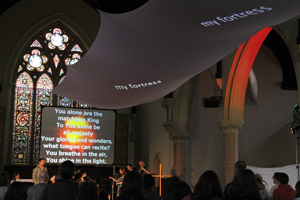
Yes, I did ‘enjoy’ the worship if you are aloud to say that sort of thing, and yes it did help me to focus on, think about and I suppose ‘meet with’ God, which I guess is the point.  But I just got so bored of staring at white text on a black background.  The church we met in had some banners up - these were all just text - and there was a nice big stained glass window (which had three characters in it that I have no idea who they were, it wasn’t obvious to me).  I got so bored I realised that I was looking around (while singing) looking for something that pointed to God and I couldn’t find it.

Jump forward two weeks - Church Without Walls National Gathering at Ingliston.  Again, I could only make part of the last day and I know there were lots of different styles of worship, singing, praying, service, etc. all going on but I only managed to get to two (more or less).   Sunday evening’s closing session for the national gathering was in the program as “Worship with Jonny Baker, Praise with Stuart Townend” which was interesting because we often use the words ‘Worship’ and ‘Praise’ to mean the same thing - singing.

Jonny Baker has posted here about what he did in that hour with an outline of the order things happened and links to resources.  Very useful if you were there but it doesn’t give the feel of what happened and neither can I. What I can say is that the visual stimulus which matched the music style and almost ancient chanting style of singing I found really helpful to quickly focus, become still and be with God.  Some of the visuals were specific to match what was being said, sung or read others less so but even on this scale (2-3000 people in a large venue with a stage fit for a rock concert) there was still an intimacy and sense of interaction.  This style of led worship with mixes of readings, liturgy, stories, etc. included asking for our physical participation in response to what was being said, it included a time to reflect what we wanted prayed for and to take away something to pray for a stranger - it was in other words, very well structured and rounded time of worship (not just singing songs)

Following this I stayed for the first song or two in the “Praise by Stuart Townend’ section, but I was too distracted, had a headache and wasn’t able to focus at all on it.  When I realised I was just singing the words for no good reason I left to go and think more about what had happened earlier.

So, are these the two extremes of contemporary worship - a guitar based band, leading song after song with the aim of getting us to think about God (presumably) and a bloke with a Mac using chilled music, singing, visuals and written words.  Perhaps it’s not just a visual thing as I had in mind when I started this post, not simply a case of eyes opened or eyes closed - perhaps it is that I’ve got a short attention span and prefer to have multiple things happening (visuals to look at, words to think about, music to listen to) and not just look at the band playing their instruments.

30
Apr

Articles: The Art of the Worship VJ

A couple of articles taken from EDIROL site entitled “The Art of the Worship VJ”

Part 1: Connecting with Visual Media

Part 2: Defining the VJ

By Stephen Proctor - www.gi-inc.org

30
Apr

What does “Christain Visualist” mean?

OK, so I started this blog under the title Christian VJ or Worship VJ, but I’mnot totally comfortable with these terms becuase the term VJ brings to mind club style visuals and in my experience this doesn’t work in worship services - unless your doing specifically DJ led worship or Dance/Club style worship which I’ve not seen much of recently (if it’s out there get in touch).

The other reaction the saying that you do Worship VJing is a blank look. So I figured that I’d take the term ‘Visualist’ which some club VJs and visual artists use and call myself (at least for this blog) a Christian Visualist.

The term is starting to grow on me and sounds less pretentious when I thought about it this way.

Mixing at Deeper Jan 2008In a worship set a pianist or guitarist by playing their instrument adds to the overall sound mix, the Visualist ‘plays’ the visual mixer (hardware or software or mix of both) to produce a visual dimension to what is going on. Aslo, while this may be planned and scripted much like the musician following written music, there is more frequently a high degree of improvising going on during the worship set.

In some ways the term Worship Visualist might be better, but I had to choose one or the other for a blog title so that’s what I’ll stick to for now. I still like the terms “Christian VJ” and “Worship VJ” and would be interested in doing more of club style mixing but, to fit the praise/ worship atmosphere it is very infrequent that you can get away with fast paced cuts and mixes.

Mixing at Deeper Sept 2007

30
Apr

How did I start doing this?

What started for me as simply running powerpoint to provide song words with suitable images has developed into using the same sort of equipment that a VJ might use in a club setting to mix custom made images during a ‘normal’ Christian worship service.

Wikipedia currently defines a VJ as “A VJ is a performance artist who creates moving visual art (namely video) on large displays or screens, often at events such as concerts, nightclubs and music festivals, and usually in conjunction with other performance art. This results in a live, multimedia performance that can include music, actors or dancers as well as live and pre-recorded video.” wikipedia article

Visually intensive worship services are often thought of in the Alt-Worship or emergent worship side of the Christian world, which is a good thing. I’ve been lucky/blessed (delete as feel comforatable) to be able to use visuals in what is basically a mainstream worship services.

I have also been involved in larger Christian conferences and events and Youth events and occasionally even ‘traditional’ alt/emergent worship (if such a dichotomy can exist :-)

30
Apr

Why start this blog?

My aim here, given time, is to post my thoughts on why artistically, theologically and even historically speaking visual stimulus during worship is another way to connect with God. Talk about how to do this from both a practical and spiritual perspective.

I will aslo try to document some events from this visual point of view, why we concentrated on one image over another, how people reacted (if at all :-) ). This will be as much for my own use as anything else but I do hope it will be of interest to others, because I don’t see much around about this sort of thing.

Hopefully there are others around who are looking for more visually stimulating worship services than staring at a projector screen with white words on a black background.